
DCMA 14-Point Assessment: 14 Checks, Thresholds & Fixes
The DCMA 14-point assessment as a checklist: every check, its pass/fail threshold, and how to fix the failures reviewers flag most on P6 and MS Project files.
Three of the fourteen DCMA 14-Point checks account for most of the structural failures seen in contractor baseline submissions: missing logic, hard constraints, and high float. If you’re reviewing a contractor’s programme and you haven’t run the 14-Point, you’re accepting a schedule on trust rather than evidence. The 14-Point sits inside the broader discipline of a structured construction schedule analysis, which is what turns a stack of activities into something the project team can actually rely on.
Bent Flyvbjerg’s research on megaprojects found that project outcomes are fat-tailed: most run modestly over, but a dangerous minority blow up catastrophically (Flyvbjerg and Gardner, How Big Things Get Done). A schedule that fails its structural checks is how a project quietly joins that tail, because the warning signs sit in the model long before they show up on site. California’s High-Speed Rail project started at a $33 billion estimate and has since ballooned past $100 billion. Boston’s Big Dig finished nine years late against its original 1998 completion plan, and ran from a $2.8 billion budget to $14.6 billion at completion (more than $22 billion once interest on the borrowed funds was counted). In every case, the schedule was the early warning system, and in most cases, nobody was reading the gauges properly.
Why the DCMA 14-Point Assessment Matters
The Defense Contract Management Agency codified the 14 checks in October 2012 as Section 4 of DCMA-EA PAM 200.1, the EVMS Program Analysis Pamphlet. They weren’t designed as a gold standard. They’re a minimum standard: the least a credible schedule should satisfy before you rely on it for forecasting, progress reporting, or extension-of-time analysis.
When a schedule fails these checks, the downstream consequences compound quickly. Missing logic means the critical path is unreliable. Hard constraints hide float. High durations mask scope that should be broken down further. Each failure is a structural defect in the model you’re being asked to trust. If the model’s unsound, the dates, the float, and the completion forecast are all suspect.
What the thresholds tell us: The DCMA 14-Point thresholds are deliberately conservative. Five per cent on missing logic, five per cent on hard constraints, five per cent on high float, zero on negative float. The standard is the floor, not a gold-plated ideal. What it means: A baseline that can’t clear the floor is a model the contractor either can’t build or hasn’t tried to build. Approving it commits you to defending a planning instrument that doesn’t function as one.
Figure 2: The 14 DCMA checks organised by category
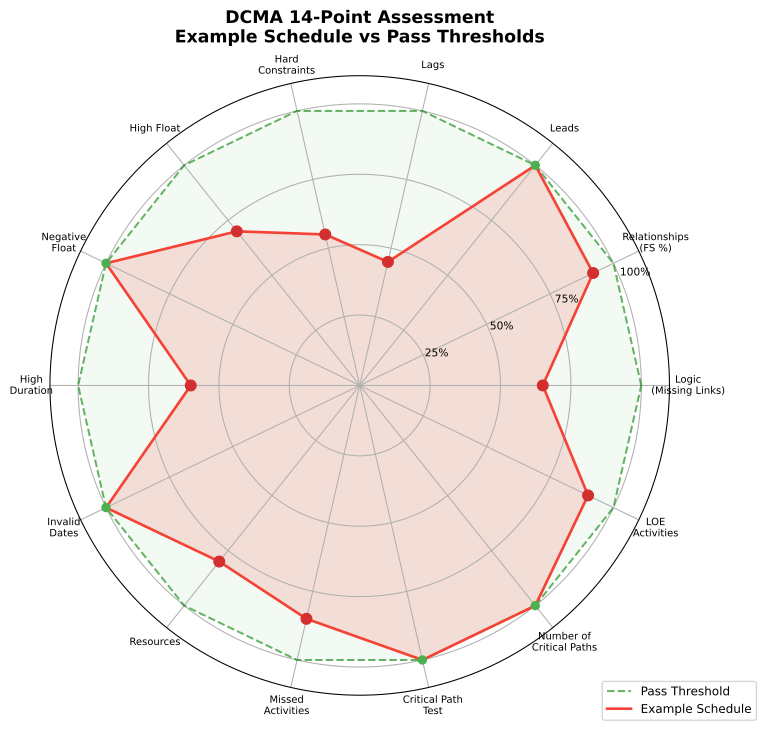 Example schedule scored across the 14 DCMA metrics against the pass threshold. Where the schedule’s value sits inside the threshold ring it passes; where it bulges outside (typically logic, hard constraints, and high float) it fails. The shape of the bulge tells you where to focus the fix.
All fourteen checks and their thresholds are also on a single page: the DCMA 14-Point quick reference.
Logic and Structure Checks (Points 1 to 4)
Logic
Every activity needs at least one predecessor and one successor, with the exception of the project start and finish milestones. Open-ended activities break the network logic, meaning the critical path calculation skips them. The DCMA threshold is strict: no more than 5% of activities should have missing predecessors or successors.
The most common cause? Contractors adding activities in a hurry without linking them into the network. The fix is simple but tedious: every open-ended activity needs a logic tie. If it genuinely has no logical predecessor or successor, question whether it belongs in the schedule at all.
Leads
Negative lag, or leads, should not exist in the schedule. The threshold is 0%. Leads distort the network by allowing activities to start before their predecessor finishes, which makes float calculations unreliable and breaks the forward-pass and backward-pass logic.
If a contractor has used leads, replace each one. Either restructure the logic into two FS ties with an intermediate activity, or convert the lead to a positive lag on an SS relationship with proper justification.
Lags
Positive lags should appear on no more than 5% of all relationships. Lags are sometimes necessary, such as concrete curing time, but they’re often used as a shortcut to represent work that should be a discrete activity.
The practical fix: convert every lag into an activity with a real duration, resources, and a clear scope description. “Concrete curing” is an activity with a defined duration, not a lag on a logic tie.
Relationship types
At least 90% of all relationships in the schedule should be Finish-to-Start (FS). Start-to-Start (SS), Finish-to-Finish (FF), and Start-to-Finish (SF) relationships aren’t forbidden, but when they dominate, the scheduling logic becomes harder to trace and the critical path harder to validate.
In construction, SS and FF ties often appear where concurrent works overlap: structural steel and cladding, for example. The fix isn’t to remove them blindly; it’s to confirm that each non-FS relationship reflects genuine concurrency, not laziness. Replace SS/FF ties that should be FS with lag-adjusted FS logic wherever possible.
| DCMA Point | What It Checks | Threshold | Common Failure Cause |
|---|---|---|---|
| 1. Logic | Missing predecessors/successors | ≤5% | Unlinked activities added late |
| 2. Leads | Negative lag | 0% | Overlapping logic shortcuts |
| 3. Lags | Positive lag | ≤5% | Scope hidden in logic ties |
| 4. Relationship Types | Non-FS relationship types | ≥90% FS | Lazy SS/FF logic |
Table 1: Logic and Structure checks with thresholds and typical failure causes
Constraint and Float Checks (Points 5 to 7)
Hard constraints
Hard constraints (Must Finish By, Must Start By, and similar) lock an activity’s date regardless of network logic. The threshold: no more than 5% of activities should carry hard constraints. When more than 5% of the schedule is hard-constrained, the critical path can’t move naturally, and float is artificially suppressed.
Soft constraints (Finish On or Before, Start On or After) are more acceptable because they allow the activity to move within the logic. Review every hard constraint: does it reflect a contractual obligation, or is it just the planner anchoring a date? If there’s no contractual basis, remove it.
High float
Activities with total float exceeding 44 working days suggest one of two things: the activity is genuinely far from the critical path, or the logic is incomplete and the float is phantom. The threshold is ≤5% of incomplete activities exceeding 44 days of float. If you’re unsure why a value is so high, the difference between total float and free float is usually where the explanation sits.
Phantom float is the real danger. An activity shows 60 days of float because it’s missing a successor tie, not because it’s genuinely non-critical. Fix the logic first, then re-check.
Negative float
Negative float means the schedule can’t meet its contractual finish date. The threshold is 0%. If any activity shows negative float, the project is already behind before it starts work.
Negative float isn’t always a schedule quality problem; it might be a genuine project problem. But it should trigger two questions: is the completion date realistic, and has the contractor proposed mitigation? If the answer to both is no, the baseline should not be accepted.
Callout: Negative float on a baseline submission is a red flag. Don’t approve a programme that’s already telling you it can’t finish on time. Require a recovery plan before accepting the schedule.
Duration and Date Checks (Points 8 to 9)
High duration
No more than 5% of incomplete activities should have a duration exceeding 44 working days. Long durations obscure progress tracking. If an activity is 90 days long and you’re reporting monthly, you can’t meaningfully measure its status at the end of each period.
The fix is activity decomposition. Break a 90-day activity into three or four activities of 20 to 25 days each, with clear intermediate milestones. This gives you measurable checkpoints and an earlier warning when work falls behind.
Invalid dates
Invalid dates are a hard zero: no activity should have an actual start or finish date in the future, and no activity should have forecast dates in the past. The threshold is 0%.
This check catches update errors. A planner enters an actual finish date of next Tuesday instead of last Tuesday, or leaves a forecast start date unchanged from two months ago. Fix them immediately; they corrupt the entire schedule’s integrity.
| DCMA Point | What It Checks | Threshold | Quick Fix |
|---|---|---|---|
| 5. Hard Constraints | Locked dates | ≤5% | Remove non-contractual constraints |
| 6. High Float | Float >44 days | ≤5% | Check for missing logic ties |
| 7. Negative Float | Float <0 days | 0% | Recovery plan or revised completion |
| 8. High Duration | Duration >44 days | ≤5% | Decompose into shorter activities |
| 9. Invalid Dates | Future actuals, past forecasts | 0% | Correct data entry errors |
Table 2: Constraint, float, duration, and date checks with thresholds and quick fixes
Resource and Execution Checks (Points 10 to 11)
Resources
PAM 200.1 (§4.10) notes that the IMS Data Item Description (DI-MGMT-81650) does not require the contractor to load resources directly into the schedule. Where the contractor does resource-load the schedule, the metric verifies that every task with non-zero duration carries dollars or hours. There is no PAM-prescribed percentage threshold for §10; the assessment is conditional on the contractor’s chosen approach.
That said, the practical case for resource loading is strong. Activities without resources can’t be cost-loaded, their durations aren’t validated against crew sizes, and they can’t support earned value analysis. In practice, programmes routinely arrive with activities that carry no resource assignment, often provisional sums, design allowances, or placeholder activities. They are also often the activities that blow out, because nobody has verified the duration against the resourcing actually planned. If you’re specifying programme requirements at the contract stage, requiring resource loading turns the §10 check from optional to enforceable.
Missed tasks
The missed tasks metric compares actual completion dates against the baseline finish dates for completed activities. The threshold is ≤5%. If more than 5% of completed activities finished later than their baseline date, the schedule is already slipping.
This metric only works on an updated schedule with actuals, so it’s not applicable to an initial baseline review. On a forensically updated programme, however, missed tasks are one of the earliest indicators of systemic delay. Where the metric runs well above the five per cent threshold in the first few monthly updates, the completion date is unlikely to be recoverable without rebaseline.
Critical Path and Performance Checks (Points 12 to 14)
Critical path test
The critical path test is a pass/fail check. Introduce a one-day delay to the first activity on the critical path. If the project finish date pushes out by exactly one day, the critical path is continuous and the test passes. If it doesn’t, there’s a logic break somewhere on the chain.
This is arguably the most important test in the whole assessment, because it validates the integrity of the critical path itself. A broken critical path means the project’s longest sequence of work isn’t being measured correctly. Find the break and add the missing logic tie.
Critical path length index
The Critical Path Length Index (CPLI) measures the efficiency needed to complete the remaining critical path on time. It’s calculated as:
CPLI = (Critical Path Length + Total Float) / Critical Path Length
A CPLI of 1.0 means the project must execute at exactly the planned rate to finish on time. Above 1.0 means there’s buffer. Below 1.0 means the project must execute faster than planned to recover. PAM 200.1 (§3.1.2.3) sets the canonical threshold at ≥0.95: a CPLI below 0.95 should be flagged for further investigation.
If the CPLI falls below 1.0 you need good progress; below 0.95 you need accelerated progress. Many reviewers treat CPLI below 0.95 as a mandatory trigger for a recovery workshop, matching PAM’s canonical threshold.
Baseline execution index
The Baseline Execution Index (BEI) measures the rate at which tasks are being completed against the baseline plan. PAM 200.1 (§3.1.2.4) defines it as:
BEI = Tasks Actually Completed / (Tasks That Should Have Been Completed By Now + Tasks Missing Baseline Finish Dates)
The denominator’s inclusion of tasks missing baseline finish dates is canonical and load-bearing: a schedule with sparse baseline data is correctly penalised rather than getting a free pass. A BEI of 1.0 means task throughput is matching the baseline plan; below 1.0 means tasks are slipping. PAM 200.1 sets the canonical threshold at ≥0.95: a BEI below 0.95 should be flagged for further investigation.
The James Webb Space Telescope is a useful reference point here. The original 2007 launch target slipped to December 2021, and successive NASA cost re-baselines pushed the budget from early-2000s estimates of a few billion dollars to a final development cost in the order of US$10 billion. If you’d tracked BEI through its execution, the index would have signalled problems early: consistent missed tasks and a falling BEI long before the cost overruns hit the headlines.
Callout: CPLI and BEI together give you a two-dimensional view of schedule health. CPLI asks whether the remaining path is achievable. BEI asks whether you’ve been hitting your milestones. If both are below 1.0, the programme is in trouble.
How To Run the DCMA 14-Point Check in Primavera P6
Running the 14-Point in Oracle Primavera P6 requires the schedule file and a disciplined process. Here’s the step-by-step. If you’re new to the file format, our walkthrough on reading and analysing XER files covers the data model the assessment runs against.
Step 1: Export the schedule. Open the project in P6. Go to File, Export, and select XER format. Save the file.
Step 2: Run the DCMA macro or use a schedule analysis tool. The DAU (Defence Acquisition University) provides a free macro for Microsoft Project. For P6, you’ll need a third-party tool such as Acumen Fuse, ScheduleReader Pro, or the DCMA Excel template. Import the XER file into your chosen tool. ScheduleLens runs the 14 checks on an uploaded .xer, .xml, .mpp or .pp file, and the sample health report shows the result on a demo programme.
Step 3: Review each metric. Don’t just look at pass/fail. A schedule that passes at 4.9% missing logic (under the 5% threshold) is still fragile. Read the percentage against the threshold and ask whether it’s acceptable, not just whether it passes.
Step 4: Document failures and fixes. For each failure, record the root cause and the corrective action. This becomes your schedule quality log, and it’s the document you’ll reference when the contractor resubmits.
Step 5: Re-run after fixes. The 14-Point isn’t a one-time event. Run it at every baseline revision and at every monthly update. A schedule that passes today can fail next month if the contractor’s update introduces new logic gaps or constraints.
Figure 1: P6 assessment workflow from export to clean report
What the DCMA 14-Point Doesn’t Check
The 14-Point Assessment catches structural defects, but it doesn’t validate the schedule’s content. The table below summarises the gaps.
| What DCMA Checks | What It Misses | Why It Matters |
|---|---|---|
| Logic existence | Logic correctness | Wrong sequence still passes |
| Constraint count | Resource overloads | Unlevelled schedules pass |
| Float values | Concurrent delay paths | EOT reliability is untested |
| Duration limits | Scope completeness | Missing work goes undetected |
Table 3: Structural checks that the 14-Point covers and the content gaps it leaves
Here’s what each gap means in practice.
Activity sequencing logic. The 14-Point tells you whether logic exists, not whether it’s correct. A schedule can pass all 14 checks and still have activities linked in the wrong order.
Resource levelling. Resource overloads won’t be flagged. Five activities running simultaneously on the same crew won’t fail any DCMA check.
Concurrent delay analysis. The 14-Point doesn’t assess whether the schedule can support extension-of-time analysis. Float suppression through constraints will show up, but the downstream effect on delay claims won’t.
Scope verification. The 14-Point doesn’t confirm that the schedule reflects the full contract scope. A schedule missing entire scope packages can still pass every metric, because the assessment evaluates the network of activities present, not whether all contracted scope is in the network.
Schedule density. There’s no check for whether the level of detail in the schedule is appropriate for the current phase. A feasibility-stage schedule and an execution-stage schedule should look very different, but the 14-Point treats them the same.
This is why we recommend the DCMA 14-Point as a starting point, not an endpoint. Supplement it with GAO Schedule Assessment Guide criteria, AACE International’s RP 29R-03, and a scope completeness check as a minimum.
DCMA 14-Point in Commercial Construction
The assessment was written for US Defence contracts, but the principles translate directly to commercial construction. The logic checks, constraint limits, and duration thresholds are schedule-agnostic. They work on a hospital build just as they work on a weapons programme.
Common failures on Australian commercial projects tend to cluster around three areas.
First, hard constraints. Contractors anchor key dates, particularly contract milestones and access windows, by adding Must Start On or Must Finish On constraints. The DCMA threshold of five per cent exists because, above that, constraints start to override the network logic the rest of the metrics depend on. A programme that appears tight when read off the bars can show substantial float once the non-contractual constraints are removed and the network is allowed to calculate.
Second, high durations. Trade contractors often submit long-duration activities because their scheduling software, or their procurement model, isn’t detailed enough. A single “mechanical services install” activity spanning several months is a familiar pattern on design-and-build work. The DCMA threshold is forty-four working days. Any activity that crosses the threshold should be broken down with a written justification, or split into shorter activities with intermediate milestones.
Third, missing resources. Activities routinely arrive without resource assignments, particularly on tier-two work where scheduling software is used as a reporting tool rather than a planning tool. Make resource assignment a contractual requirement: no resourced activity, no approved programme. Without resources, durations are assertions rather than calculations.
DCMA in extension-of-time claims
In an extension-of-time (EOT) context, the DCMA 14-Point becomes a credibility test. The Society of Construction Law’s Delay and Disruption Protocol (2nd Edition) expects the affected schedule to be a reliable basis for analysis. If the as-built schedule fails the logic check or the critical path test, the analyst’s conclusions rest on a broken model.
We recommend requiring a passing 14-Point assessment as a precondition for accepting any delay analysis. If the contractor’s schedule isn’t structurally sound, the EOT analysis built on it can’t be sound either. The same test applies whichever side you’re on; our guide to how EOT claims are analysed and reviewed sets out where the quality check sits in each.
Standards References
The following standards inform the 14-Point Assessment and should be referenced alongside it.
- DCMA-EA PAM 200.1, EVMS Program Analysis Pamphlet (October 2012), §4 (14 Point Schedule Metrics for IMS Analysis) and §3.1.2.3–§3.1.2.4 (CPLI and BEI definitions): the canonical agency-issued source for the 14 metrics, thresholds, and calculations.
- GAO Schedule Assessment Guide (December 2015), Chapter 8: provides complementary guidance on schedule quality, including best practices for logic, float, and constraints that go beyond the DCMA minimums.
- AACE RP 29R-03 (Forensic Schedule Analysis): Section 2 (Source Validation Protocols) addresses schedule integrity requirements for forensic analysis. The DCMA 14-Point complements these AACE protocols as an upstream quality screen, though AACE 29R-03 does not specifically prescribe the DCMA checks.
- SCL Delay and Disruption Protocol, 2nd Edition (February 2017): Core Principle 1 (Programme and records, paragraphs 1.18, 1.39–1.64) addresses the requirements for a properly prepared and accepted programme as the basis for delay analysis. The Protocol’s expectations on logic, constraints, and detail (paragraphs 1.45–1.47) align with DCMA’s structural quality principles.
The Practical Takeaway
Run the 14-Point on every schedule you receive. Don’t accept a baseline that fails. Don’t treat a pass as proof of quality; treat it as the minimum bar. Supplement with scope verification, resource levelling checks, and sequencing reviews. The 14-Point catches the structural problems. Your professional judgement catches the rest.
If you’re reviewing a contractor’s programme, make the DCMA 14-Point a contractual requirement at submission. Combine it with our broader guide on how to review a contractor programme and you have a defensible, repeatable process. It’s the cheapest schedule quality insurance you’ll ever buy.